Kubernetes deployment risk scoring, explained
Deployment risk scoring answers one question before you ship: is this a safe moment to change this service? Here is what a pre-flight score actually weighs, how ChangeGuard AI’s CSC Score works, and where a score alone isn’t enough.
Kubernetes on Amazon EKS · connects read-only · a judgment is advisory; execution, where you enable it, needs a single-use Permit
What deployment risk scoring is
A pre-flight readiness signal: it rolls up what’s true about your cluster right now, posture, recent change, live health, into a single, explainable score and a plain verdict, so a deploy decision isn’t a gut call.
Done well, a risk score is deterministic (the same inputs give the same score), explainable (you can see every factor behind it), and advisory (it informs the human, it doesn’t seize the wheel). A number you can’t interrogate isn’t worth trusting with a production decision.
What goes into the CSC Score
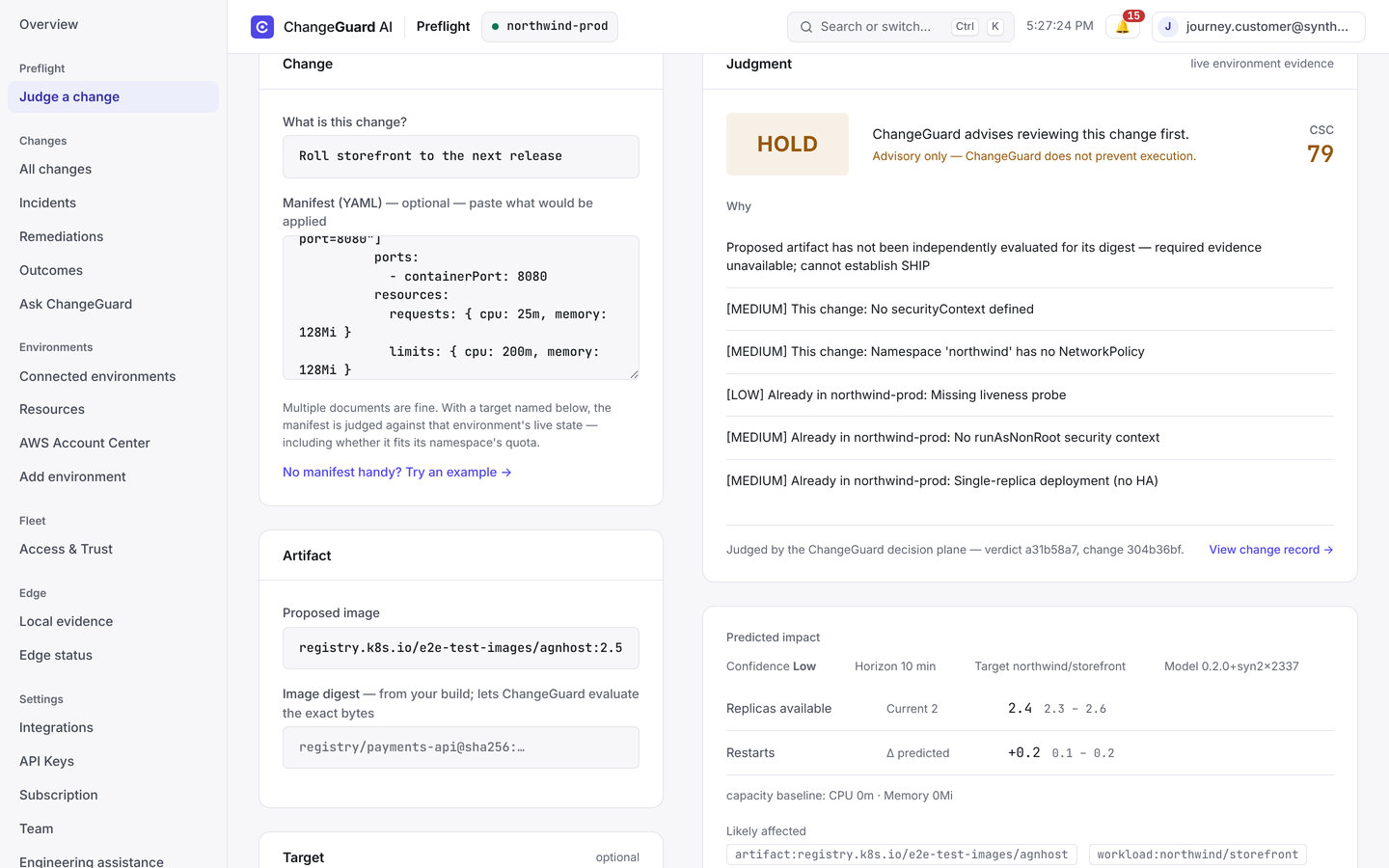
A deterministic 0–100 deploy-readiness score, and an on-demand SHIP / HOLD / BLOCK verdict with reasons. Every point traces back to a cited factor.
Security posture
CIS benchmarks (kube-bench), image CVEs (Grype), deprecated APIs, and runtime signals, the standing risk in the cluster the change lands on.
Current cluster state
Live health and whether anything is already failing, a clean score means little if the target service is mid-incident right now.
Change context
What’s about to ship and how it relates to recent changes on the same workloads, the diff, not just the fact of a deploy.
The verdict is advisory. It gives you the reasons and leaves the call with you, in CI a BLOCK fails the check only where you enforce it.
Where a score is not enough: the Advisor
Someone asks “safe to ship?” The score says SHIP, but the cluster has an active incident on the very service being changed. On the Professional and Enterprise plans the Engineering Advisor says so plainly: “this cluster has an active incident right now; I’d get that stable first.” The decision stays with the engineer; ChangeGuard AI just makes sure they’re not missing the one thing that matters.
- The deterministic score, and the read a senior engineer would add on top
- Led by what’s true right now, not generic best practice
- Advisory and challengeable: it tells you what would change its mind
The win: the judgment a senior engineer would add, at the moment of decision. See how the Advisor reasons →
Deployment risk scoring, answered
What is Kubernetes deployment risk scoring?
It’s a pre-flight signal that weighs your cluster’s current state, security posture, recent changes, active incidents, into a single, explainable readiness score and a SHIP / HOLD / BLOCK verdict, so you can judge a deploy before it ships.
How does ChangeGuard AI score a deployment?
The CSC Score is a deterministic, explainable 0–100 signal built from cluster posture (CIS benchmarks, image CVEs, deprecated APIs), current health, and change context. Every point traces back to a cited factor, so the score is never a black box.
Does a low score block my deploy?
A verdict is a judgment, not an enforcement. In CI a BLOCK fails the check by default with the shipped GitHub Action, and you can run it purely advisory; whether a failed check stops a merge is your branch rule. Execution that ChangeGuard AI itself performs is a separate authority, bound to a short-lived Permit.
What does the Engineering Advisor add to the score?
The score is deterministic; the Advisor adds what a score can’t know, like an active incident on the very service you’re changing, and says so plainly. It is generally available on the Professional and Enterprise plans, on by default.
See a deploy scored live
Watch ChangeGuard AI score a real change, return a SHIP / HOLD / BLOCK verdict with reasons, and add the Advisor’s read, in the interactive demo. No signup, no install.